If you haven't yet started play Grand Theft Auto 6 on Xbox Series X yet, you'll be facing the same dilemma I did. No, not whether you should play as a disciplined, professional criminal or a stone-cold psychopath. If you're anything like me, you'll be wondering: which controller do I need to buy during the Black Friday sales to get the absolute best gameplay experience?
Fortunately, help is — quite literally — at hand. You see, I've spent the last few weeks testing out three premium examples of the best Xbox controllers side-by-side. I've been assessing them to see which offers the most comfortable design, the most game-changing features, the slickest performance and the most epic battery life. All to help you decide which will give you the best value when you're plunging the depths of Vice City's criminal underbelly.
The controllers I've picked for comparison are three of my favorites from the last year: the Asus ROG Raikiri II Xbox Wireless, the SteelSeries Aeon Pro, and the Scuf Valor Pro Wireless. Not only have I tested them for this article, but I've lived with them (some of them for months and months) and used them during my daily gaming. That means you can be sure I've given each of them a fair shake and tried them across a variety of titles.
So let me take you through what I thought of each pad, before I reveal which one I think is the best Black Friday buy for your adventures through Leonida.
Design
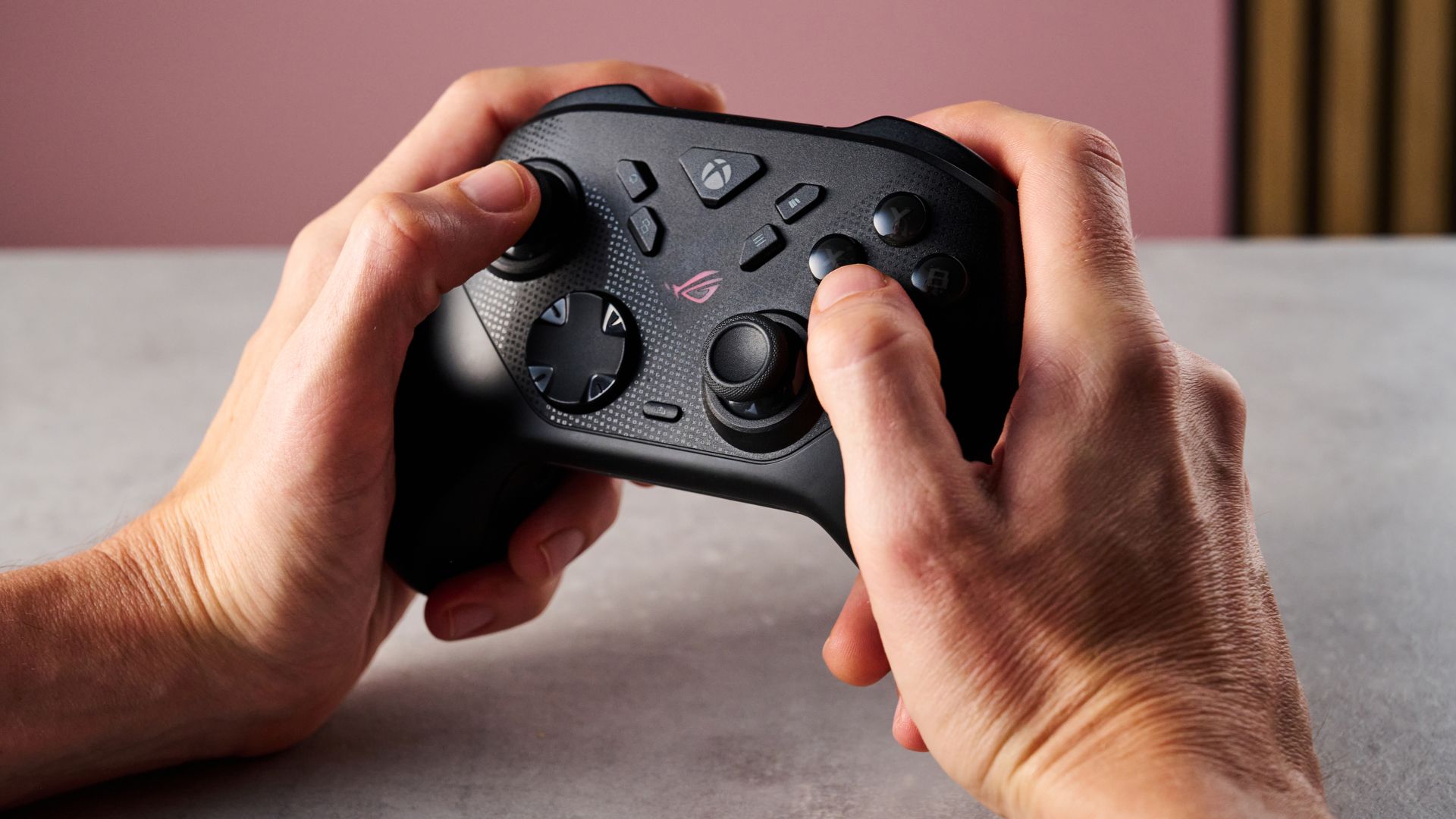
Okay, let’s start with the Asus ROG Raikiri II Xbox Wireless. While it’s arguably the least adventurous in terms of raw looks — only coming in black — I still really like what it’s throwing down, with its customizable RGB lightstrips and the gloss detail picking out the tiny lettering across its top half giving it a seriously premium look.
Ergonomically, it’s perfectly well-proportioned, resting comfortably in my hands even over long play sessions, and, unlike some pads I’ve tested, that textured grip isn’t too coarse, feeling comfortable even during epic crime sprees in GTA 6. Should you need slightly longer thumbsticks, it also comes with swappable high-profile sticks that will give you more reach and control.
All of its components are top quality too. Both its thumbsticks and shoulder triggers have TMR sensors — top of the line, drift-resistant sensors that should both activate faster than potentiometers and offer greater energy efficiency. The Raikiri II is the first pad I used with dual-mode triggers that allow you to switch between analog and clicky switches, something I now can’t live without. And its face buttons are wonderfully snappy micro-switches that pop off just like a mouse click.
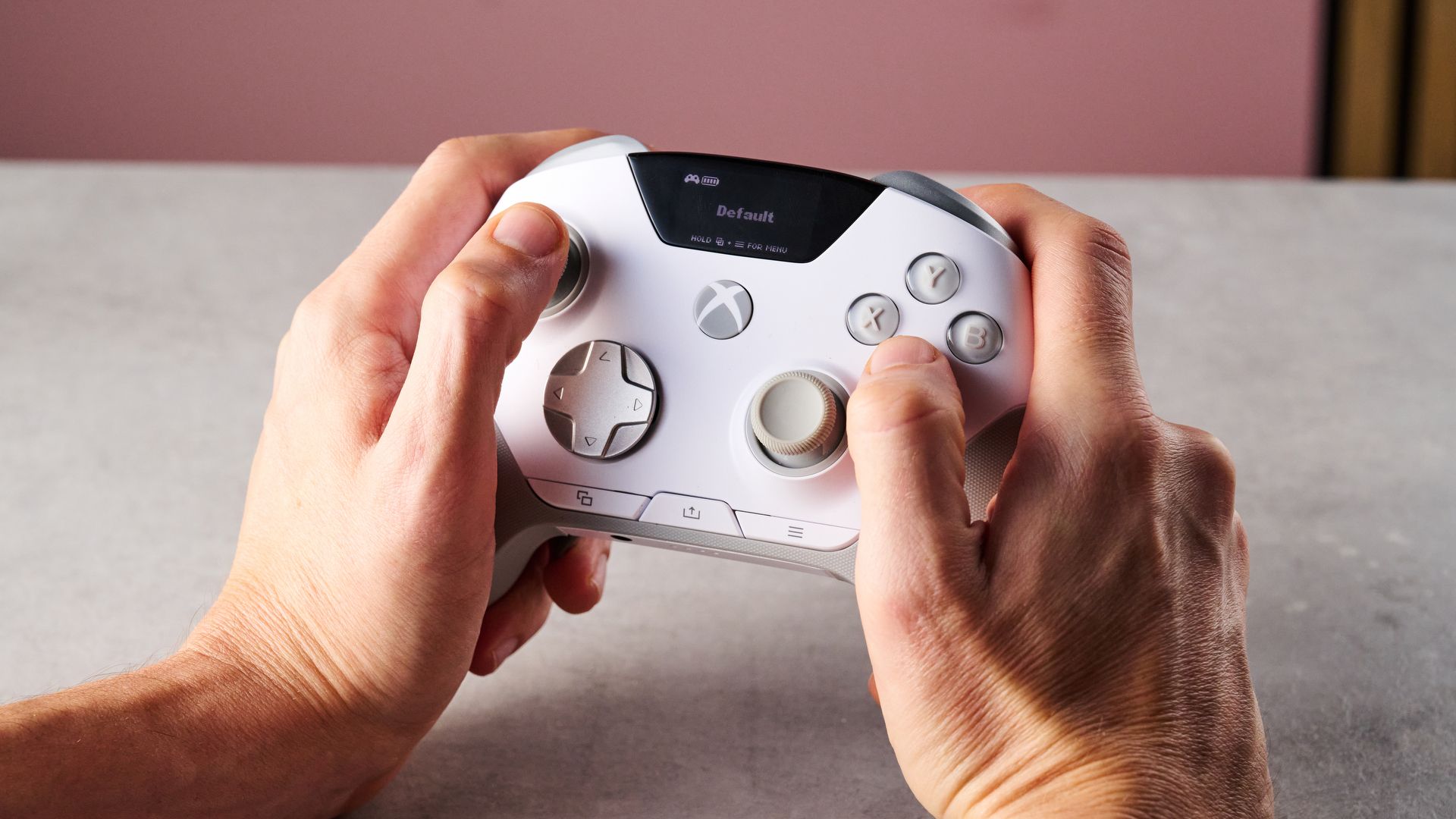
Moving onto the SteelSeries Aeon Pro now, I’d say the controller again looks relatively modest and unassuming — but looks can be deceiving. It comes in just white or black but still gives off premium vibes to me. This is helped in a large part by its OLED screen, which sits front and center on the pad and, unlike some screens we’ve seen on pads in the past, actually serves a useful function: allowing gamers to swap platform, change profiles, check battery levels and remap buttons without leaving your game.
The Aeon Pro also feels pleasingly ergonomic to me. Its curves perfectly fit my hands, those rear paddles sit naturally right where my fingertips lie, while its micro-texture grips allowed me to cling onto it like Spider-Man onto a bathroom ceiling. And while the placement of its screen means its View and Menu buttons have been shifted down to the bottom of the pad, once I got used to it, I actually preferred this, as it allowed me to move my thumb laterally rather than having to stretch over the face buttons to pause the game.
Just like the Raikiri II, the Aeon Pro offers dual-mode triggers, making it easier to switch between granular control and super-fast digital actuation, and beautifully click micro-switch face buttons. It also rocks drift-resistant thumbsticks — although it uses Hall effect tech that falls just a jot below TMR in terms of sensitivity — and these can be hotswapped out in seconds, thanks to their smart magnetic design. Finally, its rear paddles are both super-responsive and perfectly positioned, sitting proud of the rest of the device and just underneath my fingertips.
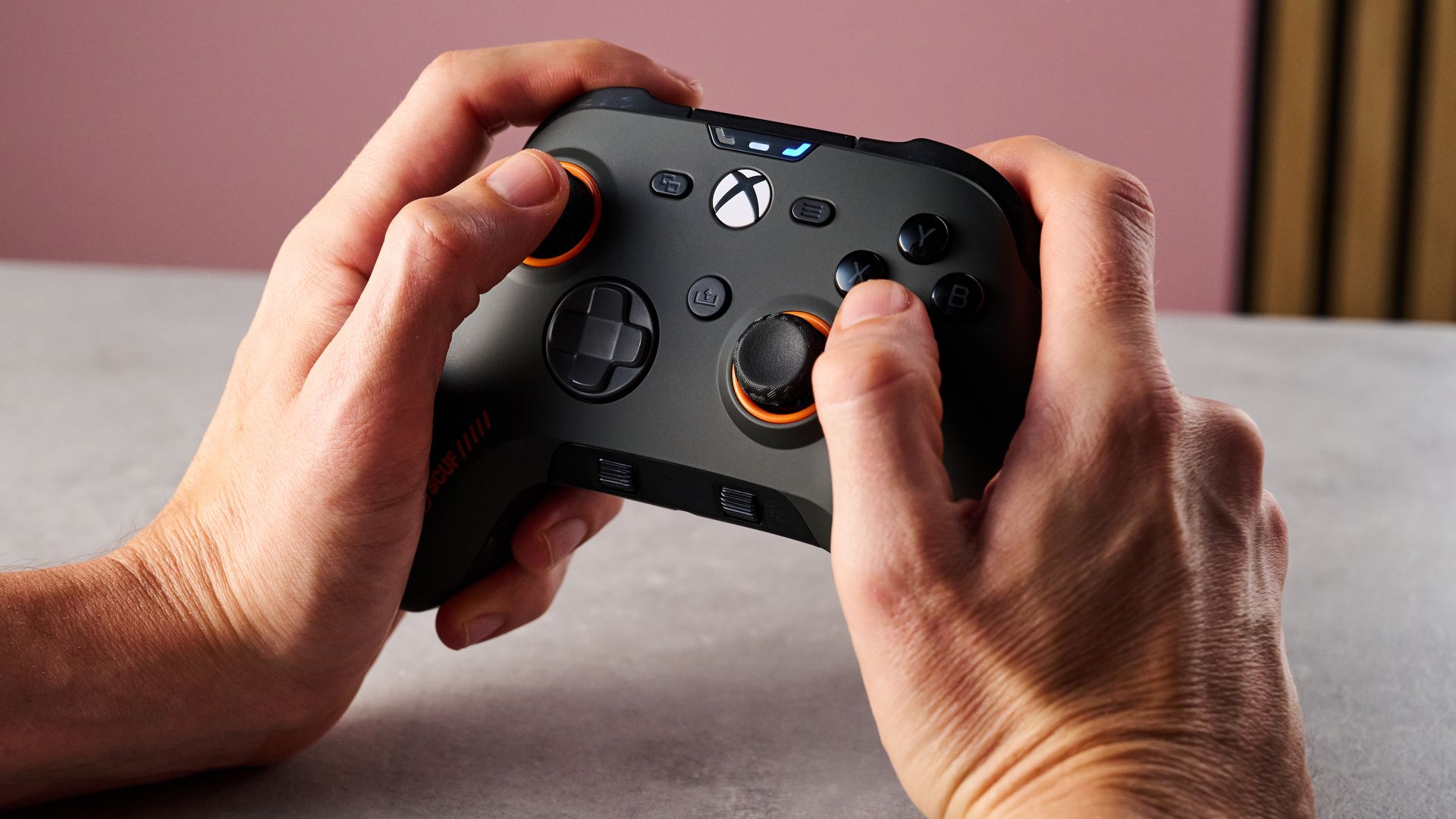
Finally, the Scuf Valor Pro Wireless is the controller that I’d say takes the biggest swings when it comes to cosmetics. There’s a staggering array of hot-swappable faceplates available for it, whether you want the golden koi-bedecked Omen or the distinctly Vice-City-style Getaway, so you can match your look to your gaming experience.
I’d say it falls a little behind the other two pads when it comes to comfort, however. Don’t get me wrong: it’s still an eminently user-friendly controller with a satisfying shape that sat well in my hands. But compared to its rivals, I found the grips a little less comfortable than the others, with them tending to get sweatier. And its rear paddles — despite having a really satisfying action — are laid out horizontally, meaning they were a tiny bit more awkward to rest my fingers on when gripping shoulder trigger and buttons using two fingers.
On the plus side, the Valor Pro Wireless rocks some great inputs. Again, the thumbsticks and triggers are TMR, granting you incredibly sensitive control over the in-game action — you can also swap out the thumbstick caps, although this wasn’t as smooth as with the Aeon Pro. There’s no micro-switch face buttons here unfortunately but those dual-mode triggers are present again, which is definitely the biggest priority for me. Perhaps the pad’s most novel feature is the two volume knobs at its base, which allow you control game audio and chat sound levels separately: a huge asset for competitive gamers.
When it comes to design, this race is quite difficult to call. If it were just about sheer good looks, the Valor Pro Wireless would walk it. But ergonomically and in terms of controls, the other two come out just in front — albeit with very little light between them. I do prefer the Raikiri II’s TMR sensors but, honestly, the increase in sensitivity is so mild that you’re unlikely to notice in everyday use. In my book, the smart OLED screen, easier to reach buttons and easily swappable sticks of the SteelSeries just about allows it to nudge ahead in my opinion but, honestly, your feeling in terms of which comes out in front might just come down to your personal priorities.
Winner: SteelSeries Aeon Pro
Features
Like all of the controllers that I tested here, the ROG Raikiri II Xbox Wireless has lightning fast connectivity. It’s compatible with both PC and Xbox, allowing you to connect either via 2.4Ghz wireless, Bluetooth or a wired connection. And thanks to its 1,000Hz polling on PC, it offers super low-latency, with Asus ROG promising that it will respond in 3.2ms using a wireless connection.
Fire up ROG’s Gear Link software and there’s a whole host of functionality and tweaks available to you. Not only can you set deadzones for the thumbsticks but you can create custom response curves for both them and those TMR shoulder triggers. On top of this, you can also adapt the pad’s vibration level to suit your personal preference and tailor its RGB lighting by changing it to a block color, breathing or cycling colors or indicating battery level.
And while I criticized the Raikiri II in my original review because it was impossible to swap between saved profiles direct from the controller, that’s since been rectified in a firmware update. That means it’s packing a ton of functionality, while removing the principle complaint I had against it.
What's more, the battery life the Raikiri II wields is truly prodigious. Over a wireless connection — the way I used these pads a decent chunk of the time — Asus ROG says the Raikiri II will last at least 30 hours. This is a seriously long life compared to the average controller and definitely matches my experience — despite the fact that I rarely use the dock, I can often go weeks without reaching for my cable to charge it up, which is seriously good going.
Next up, let’s take a look at the feature set of the Scuf Valor Pro Wireless. In terms of connectivity, it can keep up blow for blow with the Raikiri II, providing the same lightning fast 1,000Hz polling rate on PC. Again, it can connect to either PC or Xbox using a 2.4GHz wireless dongle, Bluetooth or a wired connection, giving you plenty of options for controlling each platform.
On top of this, Scuf’s Valor Companion App allows you to create potentially unlimited custom profiles and assign three of them to the Valor Pro Wireless. You can tweak a wide variety of settings, such as remapping the controller’s back paddles, setting response curves and deadzones for its thumbsticks and triggers, dialling vibration intensity in the grips and triggers up and down and even set the vibration’s response curve.
Sadly, battery life is the feature where the Scuf falls shortest. Listed at 17 hours, its longevity isn’t the worst on the market by any means, but it is the weakest out of the three I’ve tested here. Additionally, as it doesn’t come packaged with a docking station, you’ll have to remember to stick it on charge occasionally or be willing to hook it up to a cable now and then.
So far then, I think the Raikiri II has taken the lead and will take some beating here. But, in a turnabout worthy of Whacky Races, SteelSeries Aeon Pro has some tricks up its sleeve.
First off, the Aeon Pro takes multiplatform play to a whole new level, thanks to its dual wireless connectivity. Essentially, plug its dock into both your PC and Xbox and you can switch your wireless connection between them simply by toggling a setting on the Aeon Pro’s screen. Every time I used this to switch platforms, it genuinely felt a little magical and meant I could use its 2.4GHz connectivity on both devices and keep using its 1,000Hz polling rate on PC without having to switch a dongle over.
SteelSeries’ GG software also possesses some special skills. My personal favorite is its profiles. Not only can you create a potentially infinite number of profiles and save up to eight on the Aeon Pro but its game profiles will detect when you’re playing that title on PC and switch to your assigned profile automatically, which is a really neat touch.
Sadly, GG is also missing some of the features of ROG Gear Link. While you can do things like adjusting the deadzones of triggers and thumbsticks, invert the stick, tweak the level of vibration for the grips and triggers and change up the settings of the Aeon Pro’s screen, you can’t set your own custom curves for the triggers, while the thumbsticks only offer three settings: default, dynamic and exponential. And the back paddles can only be mapped to existing buttons on the pad, not additional functions, slightly limiting their utility.
If I cut things off there, it’s likely the ROG would romp to victory. But the Aeon Pro has one last comedy anvil to drop on its opponents: its battery system. Its hot-swappable batteries mean that you always have a spare one charging up in the dock, allowing you to swap in a juice-up battery when your controller runs dry.
Even taking into account the fact that each battery offers much less juice than the Raikiri II at 12 hours a time, this system means you should never really be caught out without charge — I’ve genuinely not had to plug in a cable once while using this controller, which is fantastically freeing.
So while the SteelSeries misses a few functions here and there, it’s also the pro PC and Xbox controller I’ve tested that has most pushed the envelope with its features. Both the battery system and dual-platform connectivity are things that are hard to give up when you’ve got them, so I’m definitely granting the Aeon Pro the win here.
Winner: SteelSeries Aeon Pro
Performance