One of the great advantages of the Switch 2 is its hybrid nature. Whether you want to use it in your hand, on a table, or connected to a TV or monitor, Nintendo’s latest console lets you do it all.
With this variety of playing methods comes a variety of control types. There are many different gamepads and accessories available for the Switch 2, both first- and third-party, catering to every mode.
I’ve tested and reviewed some of the best Switch 2 controllers and the best Switch 2 accessories, so I’ve rounded up what I think are the best products for each play style that you should look out for in this year’s Black Friday sales.
Enhancing the Joy-Con 2 controllers
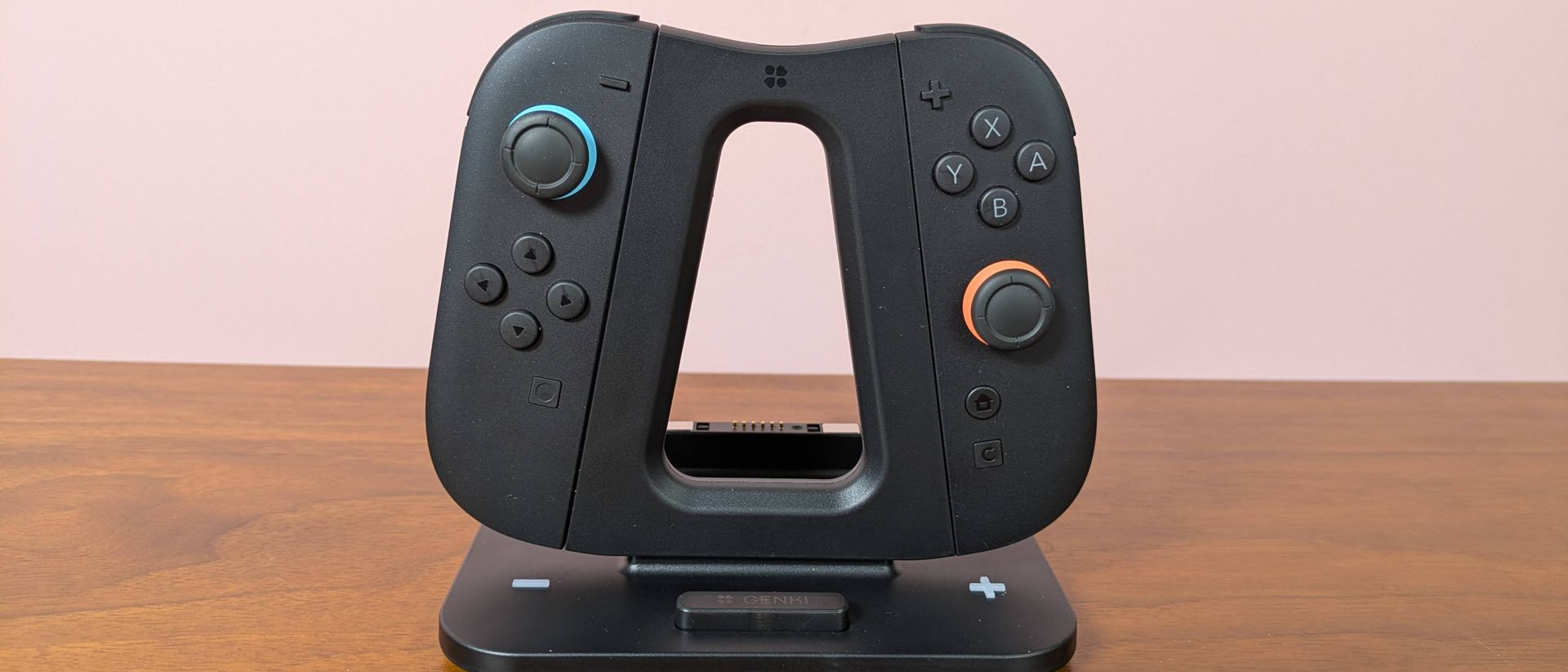
If you predominantly play in tabletop or docked mode, one of the simplest ergonomic upgrades you can make is to get a grip for your Joy-Con 2 controllers. While the Switch 2 includes such an accessory in the box, there are better, more feature-filled alternatives out there.
One such example is the Genki Dual Wield. When I tested this grip, I found it comfortable to hold; I appreciated the angle it created for each Joy-Con 2, which facilitated a more natural grip. Nintendo’s stock grip completely straightens the Joy-Cons, which is less ergonomic. However, the gap in the middle of the Dual Wield isn’t that large, which means some gamers may struggle to wrap their fingers around it comfortably. I was one of them — and I don’t have particularly big hands.
(Image credit: Future)Ultimately, though, it’s a worthy upgrade over Nintendo’s bundled solution, if not for its included charging dock alone. There’s no need to connect a USB cable to the grip itself; you simply insert the grip with the Joy-Cons attached into the dock to initiate charging.
If you want a more ergonomic option, there are accessories that merely add more bulk behind each Joy-Con 2 to make them easier to hold. The Genki Attack Vector is a great accessory that does this. It comes with three sets of attachable handles of varying shapes and sizes, so every gamer should be able to find the right fit for them.
(Image credit: Future)The advantage of such an accessory is the fact that it’s compatible with all three playing modes. What’s more, the Attack Vector also comes with an optional back cover for the console itself, providing protection. Even better, you can leave this back cover on permanently, since your Switch 2 will still fit in its dock with it attached.
I found the Attack Vector provided a comfortable way to play in handheld mode, although I did notice some Joy-Con wobble with the largest grips attached if I didn’t at least partially support the weight of the console. I didn’t, however, experience a total disconnection in such instances, but it’s an aspect worth bearing in mind.
Both the Dual Wield and the Attach Vector are relatively inexpensive ways to improve the comfort and convenience of using your Switch 2, since they don’t require buying a whole new controller. However, if you are willing to go down that road, there are some great options here as well.
A fully-fledged gamepad
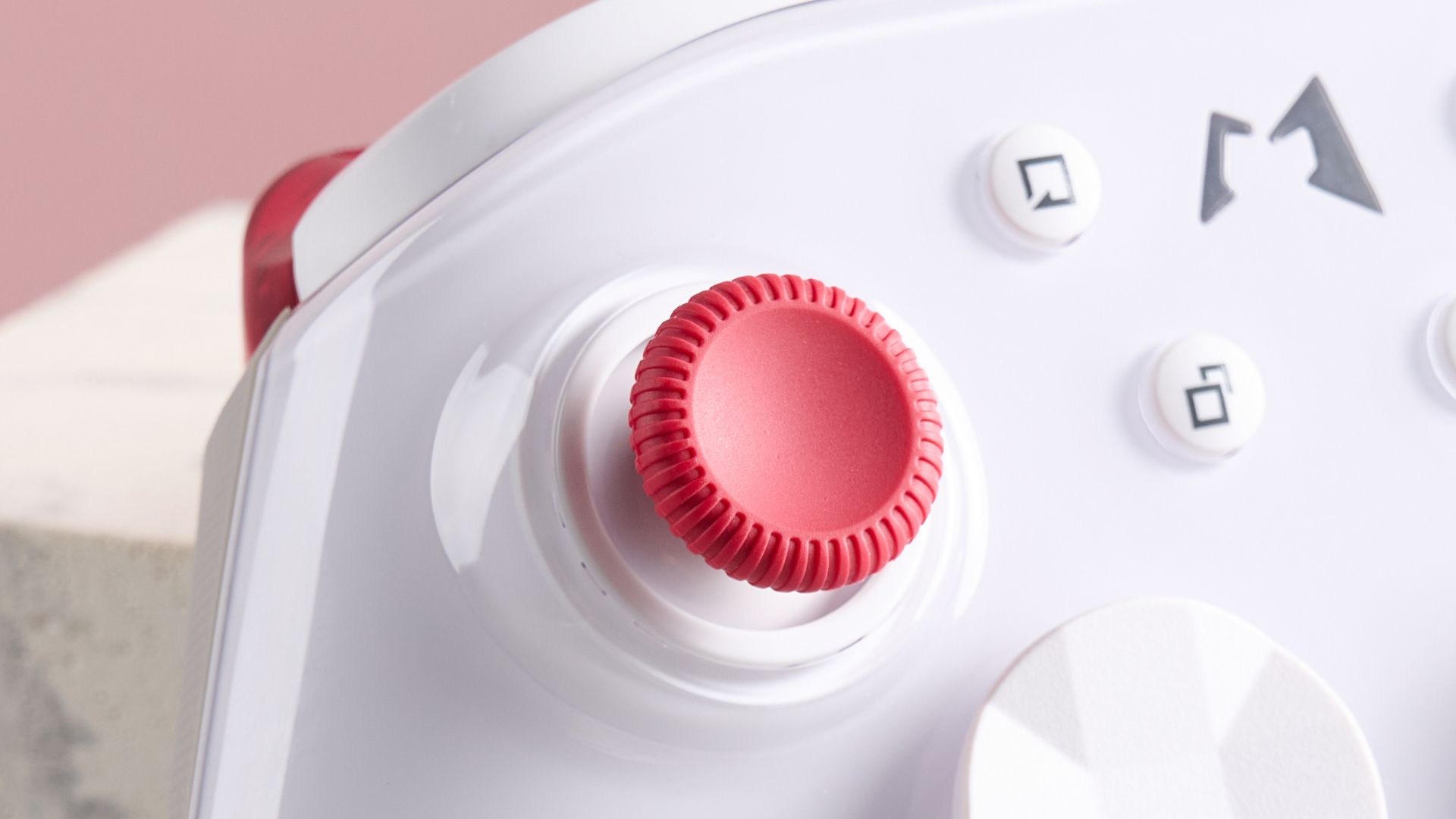
Of course, Nintendo has its own official standalone gamepad, the Switch 2 Pro Controller, which we’re very fond of. But there are plenty of great third-party options that work just as well (if not better) and have some handy extras. A great example is the Mobapad HuBen2, a controller I rate for various reasons.
Firstly, a dyed-in-the-wool gamepad like this will nearly always have better ergonomics than the Joy-Con 2 pads. This is thanks to their larger overall size and rounded grip handles, as well as to their larger and more practically placed buttons and sticks.
All these qualities apply to the HuBen2, but there’s more: the D-pad is an especial improvement over the Joy-Con 2’s, with its large, circular hat making for easier and more comfortable rolls — all-important when playing fighting games, for example. Better still, its hat is replaceable, with a more traditional four-pronged substitute included in the box, should you prefer such a design.
(Image credit: Future)I also loved this controller’s clicky buttons and precise joysticks when I tested it, while its motion controls worked flawlessly when I aimed bows in The Legend of Zelda: Breath of the Wild. I found the build quality to be excellent, and it looks good, too, with its shiny perspex front and brilliant white colorway with red accents (it’s also available in black and pink finishes).
Another advantage of the HuBen2 is that it supports multiple platforms, including the original Switch, PC, Android, and iOS. You also get more inputs, which include four customizable back buttons.
The all-in-one solution
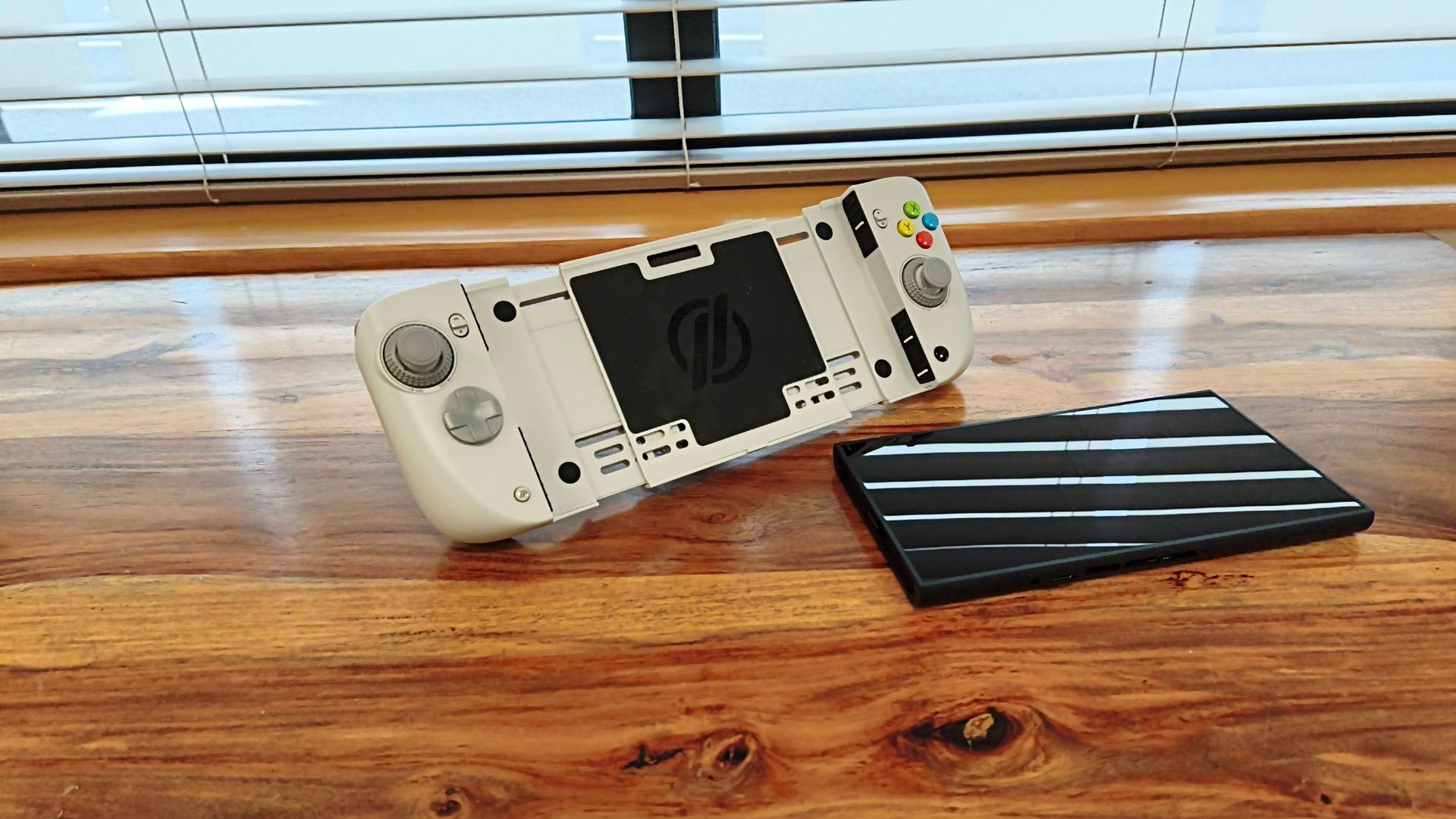
If you want something that combines the best of everything we’ve talked about into a single unit, there is a solution for you: CRKD’s Nitro Deck 2. A follow-up to the popular Nitro Deck for the original Switch, the Nitro Deck 2 clamps onto the sides of your Switch 2 in place of the Joy-Con 2 pads for handheld play, and thanks to the integrated kickstand, you can keep it attached for tabletop mode as well. It provides plenty of protection for your console, too, since the backplate is very solid and thick. Unfortunately, though, it’s too thick to let you dock the console.
However, the Nitro Deck 2 is still usable as a standalone gamepad when it’s detached from your console. What’s more, like the HuBen2, it’s multiplatform, working on PC, mobile platforms, and even the original Switch (including in handheld mode, thanks to the included adapter).
(Image credit: Future)In terms of performance, the Nitro Deck 2 is close to a standalone gamepad, too. The highlight is its analog sticks: not only are they precise and responsive, but they also feature dials that can be turned to adjust their resistance — a feature I wish every controller had. This allows any player to get the right feel for them, from very loose to very stiff, and they can do so on the fly. Again, like the HuBen2, the Nitro Deck 2 supports motion controls.
I do have a few gripes with Nitro Deck 2, though. It’s quite heavy with the console attached, making it awkward to use in handheld mode at times. Also, the shape of the grip handles caused me a few issues: rather than angling outwards at the bottom to facilitate a more natural hand position, those on the Nitro Deck 2 protrude at the top, which is less natural.
Conclusion
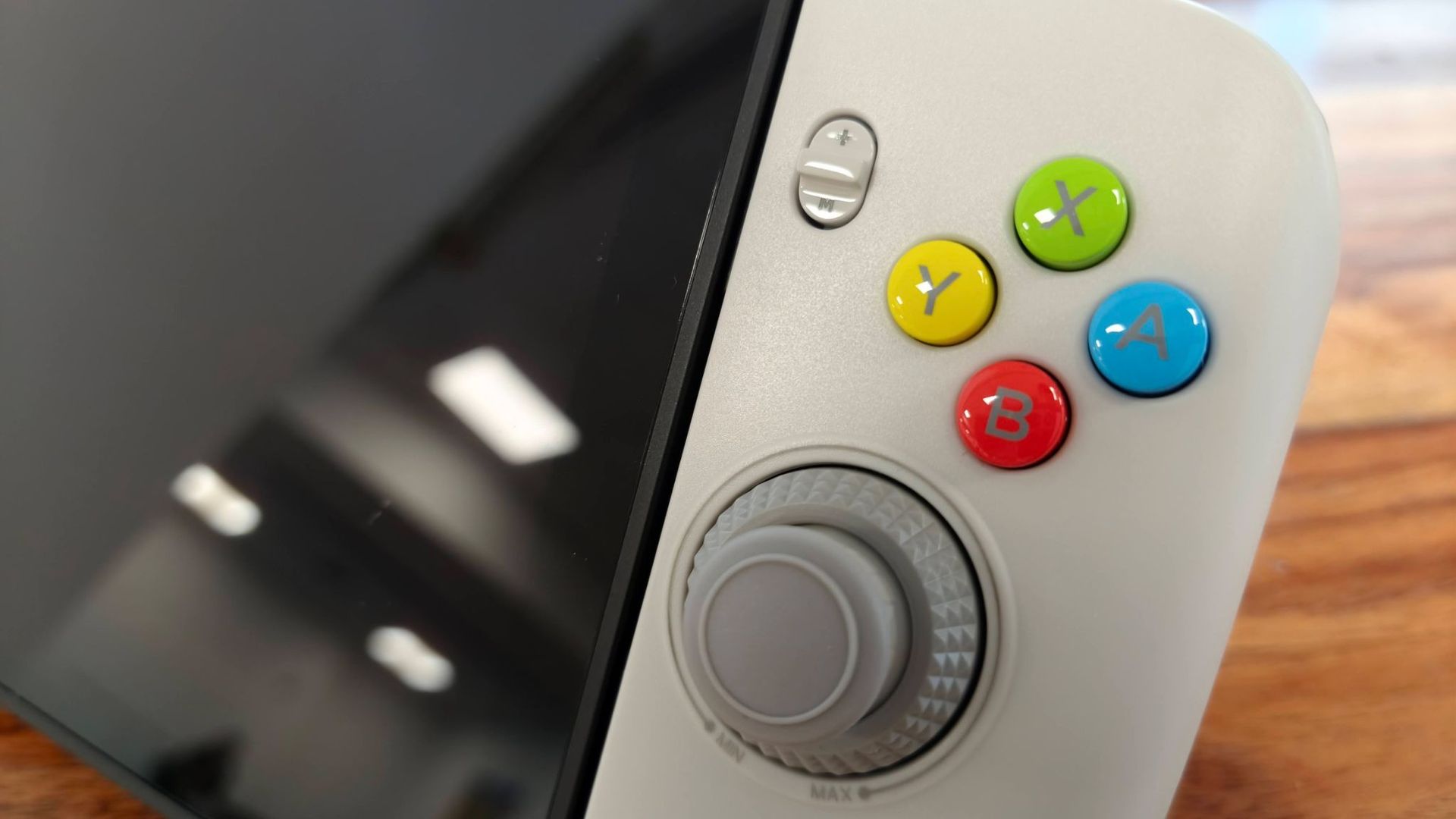
Overall, though, the Nitro Deck 2 is a fantastic option if you want just one controller for all your Switch 2 playing needs. It doesn’t come cheap, so if you’re after a more budget-friendly way to merely improve ergonomics, with a few handy extras thrown in for good measure, Genki’s Dual Wield and Attack Vector are great choices. And if you want a full-on gamepad with customizations and top-tier performance, the Mobapad HuBen2 is hard to beat. Look out for all of these in the Black Friday sales.