Gemini Intelligence is now available on more devices, including motorola signature 27 and Pixel 10. See how expanded capabilities across these devices help you do more.

Your browser does not support the audio element.
Gemini Intelligence 1 brings the best of Gemini to Android devices, helping your devices work harder for you. Earlier this year, we announced Gemini Intelligence, and this summer devices started rolling out — from the Pixel 11 to the Samsung Galaxy Z Fold8 Ultra, Z Fold8, Z Flip8 and S26 series. 2 Today, we’re introducing new features built for Gemini Intelligence, and expanding capabilities to more of Android’s most advanced devices. 3 Here’s a look at what’s new.
Gemini Intelligence on more devices, including motorola signature 27 and Pixel 10
Gemini Intelligence is coming to even more devices. Motorola is introducing its first Gemini Intelligence device, motorola signature 27, which is available for pre-order in the U.S. on November 19. And with today’s Pixel Drop, Pixel 10, Pixel 10 Pro XL, and Pixel 10 Pro Fold get the latest features for Gemini Intelligence.
Alongside this expansion, we’re bringing some of our favorite capabilities to more devices and regions, helping handle the busywork so you can focus on what matters. Rambler 4 — which turns spoken thoughts into clean, organized text in real-time — is now available on Pixel 10, Pixel 10 Pro, Pixel 10, Pro XL and Pixel 10 Pro Fold, as well as the new motorola signature 27. And task automation 5 — which lets you ask Gemini to handle logistics like ordering food, hailing rides, or booking reservations across your favorite apps — is expanding to the UK, India, and Japan.
Build custom widgets with a prompt
Create My Widget 6 , which is rolling out over the next few weeks, lets you design a personalized widget with a simple description in your own words — no coding required. Whether you want a dashboard for your upcoming trip, a monthly spending tracker, or a race day countdown, Create My Widget can pull in information from Gmail, Calendar, and Search to create a custom widget just for you, giving you the information you want at a glance on your homescreen.
Get personalized tech support with Device Assistance
Device Assistance 7 helps you control, change, or fix your device by just asking your phone for help. Ask Gemini to clear up space on your device, check which apps can access your location, or mute distractions while making sure important calls still come through. Gemini deeply understands your device so it can act as your personal device expert.
Experience proactive help across a range of screens
Gemini Intelligence is designed to support you across whatever screen you’re using. Last month we launched Googlebook, the first laptop designed for Gemini Intelligence.
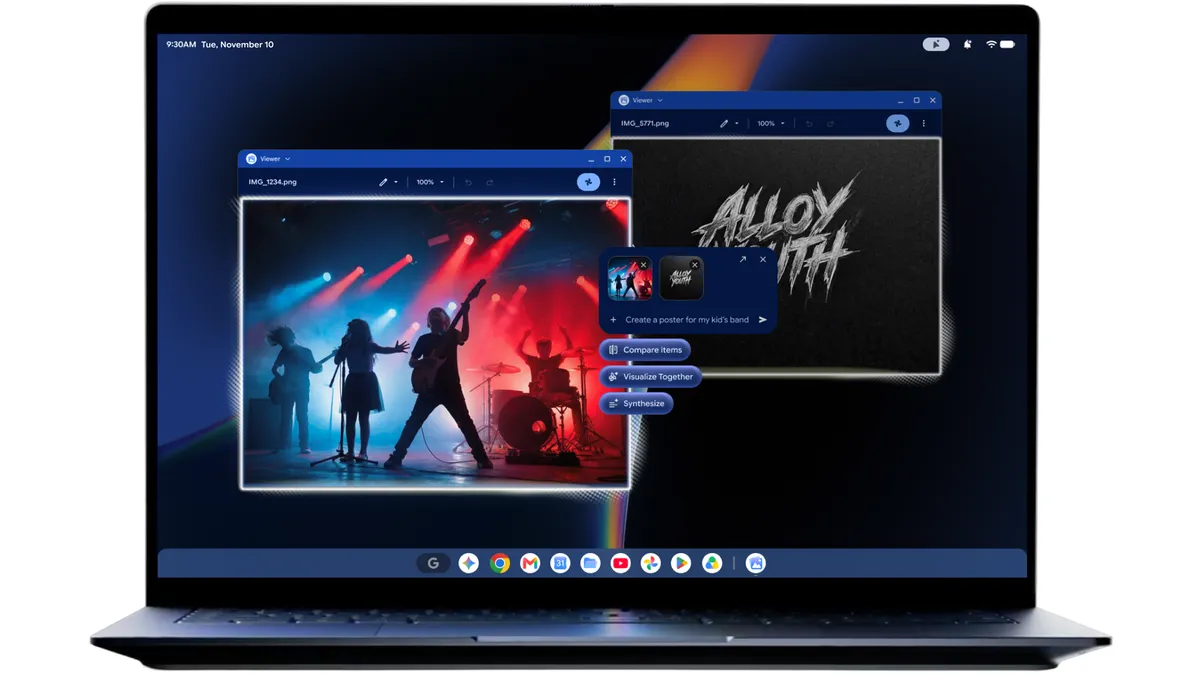
And if you have a Pixel phone with Gemini Intelligence, it will soon bring proactive suggestions to Android Auto — connecting the dots across your apps to surface helpful, personalized suggestions 8 when you need them. For example, if your friend texts you to ask where you are meeting for a pilates class, Gemini Intelligence on Android Auto can find your confirmation email and instantly suggest sending the address with a single tap.
Plus, in the next few weeks, Create My Widget is coming to Pixel Watch. You’ll be able to design widgets that keep the details that matter to you right on your wrist.
Check your inbox to confirm your subscription.
You can also subscribe with a different email address.