The experience was designed and tested by Deaf and native signers.
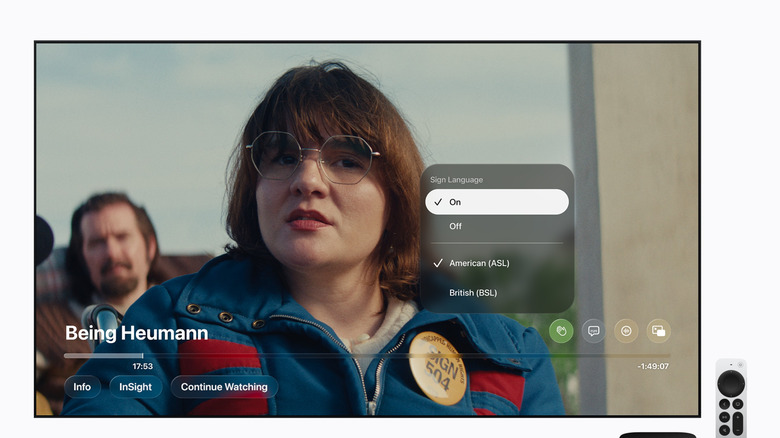
Apple is bringing a new accessibility feature to Apple TV. Starting with the release of its latest original film Being Heumann on November 13, it will be offering sign language interpretation on a selection of its original titles.
In addition to Being Heumann, which tells the story of disability rights activist Judy Heumann, the film F1 will also offer interpretation for American Sign Language (ASL) and British Sign Language (BSL). The company added that the interpretations will also be available later this year for its movies Greyhound and Way of the Warrior Kid, with more Apple Original titles to follow.
Apple says that each sign language interpretation was "carefully crafted to fit and complement the Apple Original film it interprets."
To see these performances, you'll have to make sure you're using the Apple TV app on a device running iOS 27.2, iPadOS 27.2, macOS 27.2, tvOS 27.2 or visionOS 27.2. It will also work on supported third-party devices "running the latest app software."
Once you've made sure you're on the right version, go into the Apple TV app settings to turn on the Sign Language feature. After that, you should see it as an option on supported titles when you're browsing or searching for something to watch. The Sign Language symbol, which looks like a slightly slanted or waving hand, will appear next to other icons like AD for audio description, for instance.
As you're playing something, you can select the Sign Language option above the playback progress bar and choose from the available languages. After that, the interpreter appears in the bottom right, layered on top of the film.
In time, when more titles offer this feature, you'll be able to find them more easily through the app's search function, by using descriptive phrases like "with ASL" or "with BSL." And to aid discovery, Apple will create a collection within the TV app called "Movies & Shows with American Sign Language."