Alexa Tablet 12 Pro review: One-minute review
When Amazon announced its new Alexa Tablet 12 Pro, I found myself at a crossroads. On the one hand, despite my criticisms of the company’s product ecosystem, I’ve used Amazon Echo smart speakers and displays to control my smart home for several years, and I do appreciate the brand’s approach to providing a broad spectrum of price points in its device lineup.
But I don’t like that many of these devices are treated as billboards for Amazon’s wider products and services, and Kindle Fire tablets are (or were) the biggest offenders; FireOS was a sluggish, bloatware-loaded platform that barely functioned in itself, let alone as a tablet OS with its limited app store.
So, hearing that Amazon had launched an Android-based tablet came as a genuinely welcome surprise, and I was particularly excited to try its top-of-the-line 12-inch nanomatte screen model. I’ve spent two weeks testing the Alexa Tab 12 Pro, and while it’s still far from perfect, it’s a surprisingly competent and well-thought-out device for the price. With time (and perhaps a second-generation model), Amazon could finally be making its mark in the tablet market.
(Image credit: Future)The Tab 12 Pro’s design is simple but slick, its specs are decent enough and help keep the price low, and some of the added features (including those that drive the user towards Amazon services) feel smartly integrated into the tablet. And the nanomatte display variant? It’s a triumph for Amazon: clear and crisp, defiant to most reflections unless under direct light and wonderfully vibrant.
I’ve not seen the non-nanomatte version of the Alexa Tab 12 Pro, but I can’t imagine it lives up to the model I tested; in all likelihood, nanomatte is every bit worth the $50/£50 upgrade. Equipped with it, the Tab 12 Pro’s 12-inch display is one of the best screens in its category, and really, that’s what a lot of everyday customers are looking for versus performant chipsets, high-spec cameras, and powerful speakers.
That being said, the cracks do show in some of the Tab 12 Pro’s lower-end specs, and it feels a little like Amazon’s focus on delivering a well-rounded product comes at the expense of the Alexa Tablet 12 Pro having a real, hard-hitting selling point — and perhaps its longevity, too.
For instance, while its blue light-reducing reading profiles, 3:2 aspect ratio, paperlike screen texture, and slick Kindle experience make it great for reading books and documents alike, it’s too heavy to use one-handed and stash away like a typical e-reader. For streaming video, the screen is bright and clear, but that vibrancy I mentioned before can mean colors are a little overblown, even if you tune them down with the different profiles in settings, and the tablet’s speakers are pretty flat if you want to listen aloud. Even for its main selling point, its productivity usecases, the chipset doesn't offer the longevity it needs to keep pace in 2-3 years time under heavy loads.
This is a thread that will follow through much of my commentary on Amazon’s best-ever tablet; being a ‘jack of all trades, master of none’ device doesn’t really do much for me, even in a general-use tablet. Still, the Alexa Tab 12 Pro is far from a disappointment overall, and especially for Prime members, Kindle lovers, or those wanting a great household management-come-productivity slate, it’s a really solid Android tablet.
(Image credit: Future)Alexa Tablet 12 Pro review: Price & availability
- Starts at $499/£449 for the 12-inch model without nanomatte
- Alexa Tablet Pro keyboard is $149.99 / £129.99
- Alexa Tablet Pro Pen is $89.99 / £79.99
- Available at Amazon
The Alexa Tablet 12 Pro comes in at $499/£449 in its base configuration with 128GB storage and its standard display; for $/£50 more you can add the nanomatte display, and for $/£100 more you can upgrade to 16GB RAM / 256GB storage.
There are optional peripherals to factor in too; sold separately, the keyboard costs $149.99 / £129.99, and the stylus is $89.99 / £79.99, but you can bundle these in with the tablet for an added cost of $150/£140. These are fairly steep standalone prices, so if you think there’s a chance you’ll benefit from these peripherals, I’d buy them outright.
While a lot of the Tablet 12 Pro’s specs are middling, at its price point and versus the competition, this is a pretty solid value proposition; Amazon will often trim the fat from its hardware to reach low prices, and it’s a similar story across the other smaller tablets in this lineup. The Alexa Tablet 8 starts at $229.99 / £199.99 with 4GB RAM and 64GB storage, and the Tablet 11 comes in at $329.99 / £289.99 with 8GB RAM and 64GB storage. These smaller models can be bought without ads for an extra $20/£20 a piece.
By comparison, Samsung’s Galaxy Tab S10 FE is slightly less powerful, has a slightly smaller battery and a 90Hz screen, but does offer a slightly better front camera; it starts at $549.99 / £539. Apple’s latest iPad Air comes in at $749 / £749, and while it does offer the more powerful M4 chipset, it’s smaller at 11 inches and has a static 60Hz display versus the Alexa Tablet 12 Pro’s 120Hz.
I’ve seen a lot of discussion around whether the Tablet 12 Pro’s low price is worth paying for a product that will inevitably become more of an ad platform as new updates roll out. With the freedom of Android OS, it’s a little easier for consumers to have their say on what they see by downloading a different launcher, but I’d be doing a disservice to those who have been burned by aggressively targeted ads (especially on the Echo Show) if I didn’t at least acknowledge how ads may factor into the value proposition here. That being said, I’ve barely seen anything ads-wise in my time testing the Tablet 12 Pro…
- Value score: 4/5
Alexa Tablet 12 Pro review: Specs
Alexa Tablet 12 Pro SpecsAlexa Tablet 12 Pro base model
Alexa Tablet 12 Pro (with nanomatte) I tested
Starting price
$499/£449
$549/£499
Operating system
Android 16 (17 coming soon)
Android 16 (17 coming soon)
Chipset
MediaTek Dimensity 8400 4nm 8-core CPU
7-core GPU (Arm Mali-G720)
MediaTek Dimensity 8400 4nm 8-core CPU
7-core GPU (Arm Mali-G720)
Storage
128GB / 256GB
128GB
Display
12-inch 2.8K touch screen 2.8K display, up to 120Hz refresh rate.
12-inch 2.8K touch screen 2.8K Nanomatte display, up to 120Hz refresh rate.
Cameras
13MP main, 8MP front, both with 1080p Full HD video
13MP main, 8MP front, both with 1080p Full HD video
Battery
9000mAh, Amazon cites up to 16 hours video playback
9000mAh, Amazon cites up to 16 hours video playback
Connectivity
Bluetooth 5.3 LE, USB-C 3.0 port with support for Wi-Fi 6E
Bluetooth 5.3 LE, USB-C 3.0 port with support for Wi-Fi 6E
Weight
550g
550g
Dimensions
270.8 x 183.85 x 6.5 mm
270.8 x 183.85 x 6.5 mm
(Image credit: Future)Alexa Tablet 12 Pro review: Design
- Slick and simple design
- A little on the heavier side
- Magnetic peripherals (added cost) for productivity
Amazon’s not changing the game with its Alexa Tablet design aesthetically, but there are a few things of note about its slate.
Its 3:2 aspect ratio (270.8 mm x 183.85 mm x 6.5 mm) makes it a great tablet for productivity; you can read documents and books with ease, and there’s plenty of room for multitasking in its horizontal orientation. It’s a little heavy at 550g, but it does feel well-built, offering IP52 dust and splash resistance. There’s an elegance here I’m not quite used to in Amazon’s products; from the cursive Alexa branding on the back panel to the premium-feeling aluminum casing, which is surprisingly smudge-proof.
Embedded into the right-hand side bezel, the 8MP front camera is positioned just off-center when the tablet is stationed horizontally, and on the rear of the tablet, there’s a 13MP main camera — both offer 1080p full HD video.
On the right side of the tablet’stop edge, there’s a fingerprint sensor lock button, and at the top of its right-hand side is the volume rocker. On the bottom edge, you’ll find its USB-C 3.2 Gen 1 port (the smaller screen models have USB-C 2.0, for what it’s worth) and along the left-hand side are four pogo pins for attaching the folio keyboard.
(Image credit: Future)Speaking of which, Amazon sent me the keyboard casing and stylus to test for this review, and while the price to add them both is a little steep, they unlock a great deal of functionality in the tablet. I wish Amazon had added a backlight at this price point, but broadly speaking, I’ve very few complaints.
The chiclet keyboard is soft and clicky but sturdy, featuring a dedicated Alexa+ key in lieu of a right control button as well as a writing assist key in the top-right hand corner. The trackpad is responsive and smooth, and there are ample shortcuts for productivity users. I don’t love the magnetically attaching rear cover and its fold-out kickstand; a few too many times, this popped off of the tablet while I was adjusting the height, and it doesn’t offer much stability if you want to use the tablet on your lap, or indeed any uneven surface.
The stylus magnetically attaches and charges, and offers a nice weight for a natural drawing experience. Its top end can be used as an eraser, and if it’s missing, you can find it by triggering an admittedly soft and quiet ping.
- Design score: 4/5
Alexa Tablet 12 Pro review: Display
- Optional nanomatte display is well worth the upgrade
- Smooth and super responsive
- Great features for reading
The finest feather in the Alexa Tablet 12 Pro’s cap is its main screen, an opinion which is colored, by and large, by my love for the optional nanomatte display.
The tablet’s 12-inch 2.8K LCD screen offers a 2800 x 1840 resolution, 280ppi (pixels per inch), and a buttery smooth 120Hz touchscreen. I’ve only seen and tested the nanomatte version, and that’s a real boon when it comes to anti-glare; in every circumstance barring direct sunlight or direct indoor light like nearby table lamps, it’s easy to see from most viewing angles, even despite only offering 500 nits of brightness.
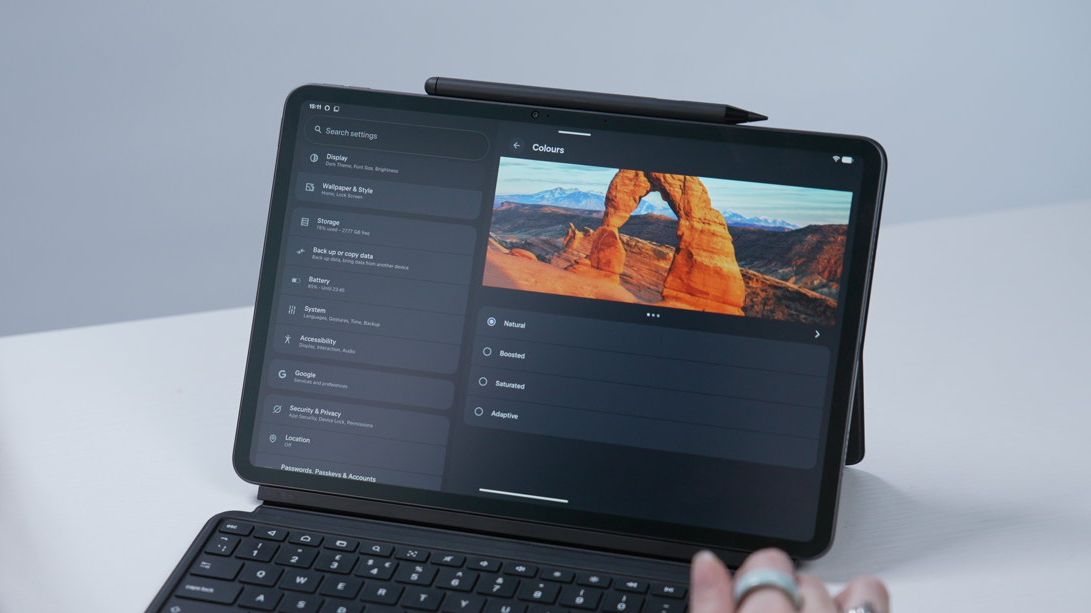
The default color profile is Boosted; I found this to be a bit too vibrant in most settings, in particular while watching TV series, but the Natural profile is much better unless you’re in an especially bright environment.
The gritty, paper-like nanomatte texture makes it easy on the eyes when reading, too — and even offers a decent bite for drawing and writing with the Alexa Tablet Pro Pen. That being said, I noticed there’s poor palm detection while drawing in apps like Clip Studio Paint, so if you’re looking for the best possible tablet for drawing, you’re better off with more specialized slates like the iPad Pro or Samsung Galaxy Tab S10 Ultra.
- Display score: 4.5/5
Alexa Tablet 12 Pro review: Performance
- Yay for Android…
- But app compatibility issues and remnants of Amazon bloatware remain
- Makes the most out of some middling specs
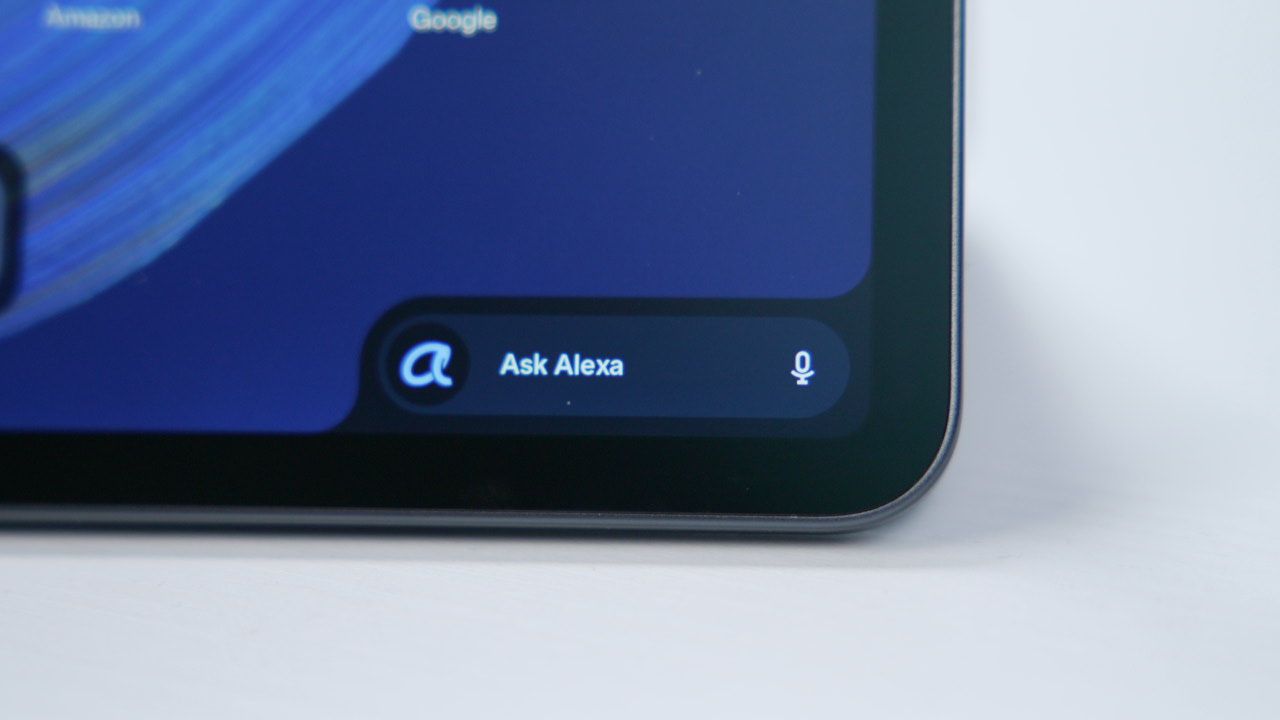
Unlock the Alexa Tablet 12 Pro, and you’re greeted by its default launcher with Amazon services and Alexa baked in; these elements are omnipresent, with a widget in the top-left corner for recently viewed media on Amazon platforms as well as the Ask Alexa search bar in the bottom-right corner, which pops out into a chat window when pressed.
I don’t hate these features as much as other reviewers and customers seem to, but that’s in part because I often do want to hop back into my last-read Kindle book or quickly dive back into playlists, movies and TV series. And besides that, the Tablet 12 Pro is far less egregious with its advertising (at least, for now) than other Amazon devices I’ve used. Plus, thanks to Android OS, you can just switch out to another launcher if you really hate Amazon’s footprint.